第一步:先解鎖域名
點擊域名后,進入域名詳情頁,下拉到頁面底部,然后點Lock ED解鎖!

第二步:獲取轉(zhuǎn)移密碼
Transfer&Lock選項中的Authorization Code,選擇Seed Email接受驗證碼

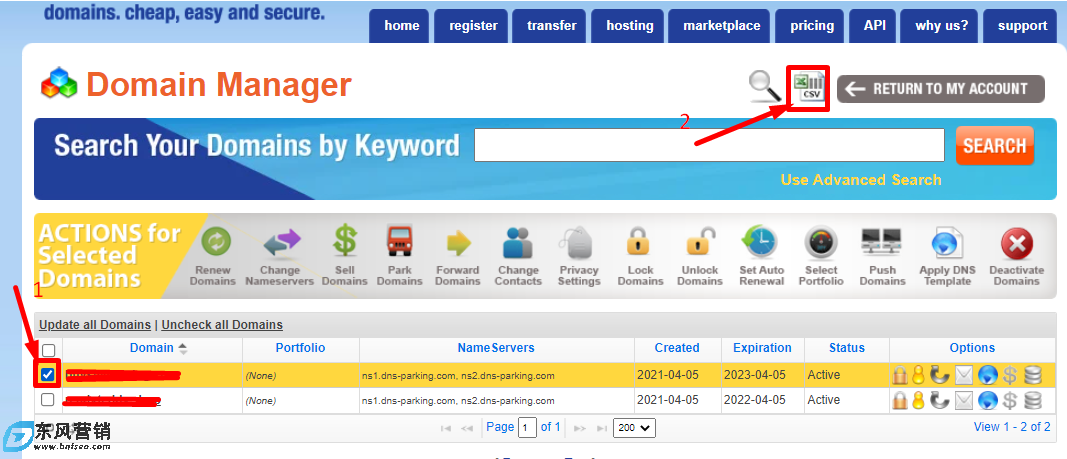
也可以從"域管理器"中獲取代碼,只需單擊您的域旁邊的復選框,然后單擊CSV圖標下載:
第三步:到其他域名注冊商操作轉(zhuǎn)入
這一步不做說明,域名接收大同小異,轉(zhuǎn)入阿里云的說明很清楚!
第四步:提交快速轉(zhuǎn)出
在其他運營商交完費、輸完域名轉(zhuǎn)移碼后,怎么提交快速轉(zhuǎn)出。分為兩種形式,一種是等待一定的時間后,原注冊商自動允許轉(zhuǎn)出,這個時間一般較長,至少需要等待5天,另一種形式就是域名擁有者自行在原注冊商確認,完成域名的快速轉(zhuǎn)出。
轉(zhuǎn)移操作完成后等一小時左右,然后打開轉(zhuǎn)出狀態(tài)查詢地址:https://www.namesilo.com/account_transfers.php,進入傳輸管理器頁面,點擊批準圖標,加快傳輸速度。大概15分鐘內(nèi)就完成了轉(zhuǎn)移過程!
1、在進程表中看到以下內(nèi)容后,點擊后面的批準圖標,加快傳輸速度
Notified Registrant and Admin
Sent an email notifying registrant and admin of the transfer request with an option to cancel the request.
(通知注冊人和管理員發(fā)送了一封電子郵件,通知注冊人和管理員轉(zhuǎn)移請求,并提供取消請求的選項。)
2、批準操作
Approve Outbound Transfer
[ Return to Transfer Manager ]
Use the form below to approve the outbound transfer for 1111.com. Once you submit this form, our system will automatically approve the transfer with the registry within 15 minutes. This will result in your transfer being completed very shortly. Once the transfer completes, the domain will be sponsored by your new registrar and will no longer be in your NameSilo account.
Approve Outbound Transfer
Click the Submit button below to approve this outbound transfer requst.
(批準出站轉(zhuǎn)移[返回轉(zhuǎn)移經(jīng)理]使用以下表格批準1111.com的出站轉(zhuǎn)移。提交此表格后,我們的系統(tǒng)將在15分鐘內(nèi)自動批準與注冊表的轉(zhuǎn)移。這將導致您的轉(zhuǎn)移很快完成。轉(zhuǎn)移完成后,該域?qū)⒂赡男伦苑丈藤澲⑶覍⒉辉僭谀拿Q帳戶中。批準出站轉(zhuǎn)移單擊下面的提交按鈕,以批準此出站轉(zhuǎn)移重新解釋。)
3、15分鐘內(nèi)等待成功
Pending Forced Approval
Our system will auto-approve the transfer at the first possible time (typically within 15 minutes).
(我們的系統(tǒng)將在第一次可能(通常在15分鐘內(nèi))自動宣傳轉(zhuǎn)移。)

當你需要將域名快速從Namesilo轉(zhuǎn)出時,只需要登錄Nameilo網(wǎng)站,選擇“Transfer Manager”,在“Pending Outbound Transfers”列表中找到你要轉(zhuǎn)出的域名,點擊“APPROVE”15分鐘就可以轉(zhuǎn)移成功了。即可快速的將域名轉(zhuǎn)入到新運營商。
標簽: